
If you’re managing a WordPress site, you’ve likely experienced the frustration of trying to keep track of changes—whether it’s plugin updates, WordPress version upgrades, or the occasional theme tweak.
Not to mention, if you’re running multiple sites or working with a team, staying on top of everything can feel like a never-ending task.
Let’s be real, sometimes you just need a way to track what’s happening behind the scenes.
That’s where the WebCare WP Status Plugin steps in! This handy plugin logs vital system information and saves it as easy-to-read JSON files.
It works automatically on a schedule and lets you download logs with just a click. Here’s how it can simplify your WordPress management process!
Current Challenge – Can’t Keep Track of Changes in WordPress
WordPress is a powerful tool, but the ecosystem around it is constantly changing. Every time you update a plugin, install a new theme, or modify the database, you’re making changes that could affect the functionality of your site.
As a company offering Website Care Plan to various location, keeping a service log is important
If you’re not keeping a close eye on these updates, things can spiral out of control—especially when you start encountering issues like slow load times, theme conflicts, or even security risks.
Wouldn’t it be nice to have an easy way to log all the important system data—WordPress versions, plugin status, database size—so you can review changes whenever you need?
The Benefits of This Plugin – Stay on Top of Your WordPress System
The WebCare WP Status Plugin solves a common issue for site administrators. By logging key system info, you get an organized view of everything happening behind the scenes.
Instead of relying on memory or manual note-taking, you have a system that does the tracking for you. This gives you more control, fewer headaches, and ultimately more time to focus on your content and business growth.
Key benefits include:
- Automatic logging: No more worrying about manually tracking changes.
- System snapshots: Get a clear picture of your WordPress environment with every log entry.
- Quick access: Easily download or clear logs directly from your dashboard.
The Features – A Simple Plugin Packed with Value
Here’s a breakdown of what WebCare WP Status Plugin offers:
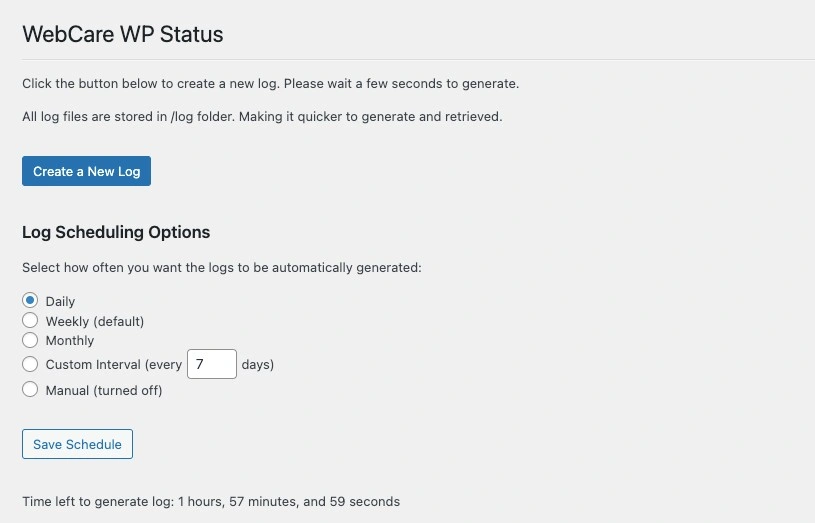
- Automatic log generation: Set up automatic logs to run on a daily, weekly (default), or monthly basis. You can also create custom intervals, like every 5 days, or simply disable the schedule and run logs manually.
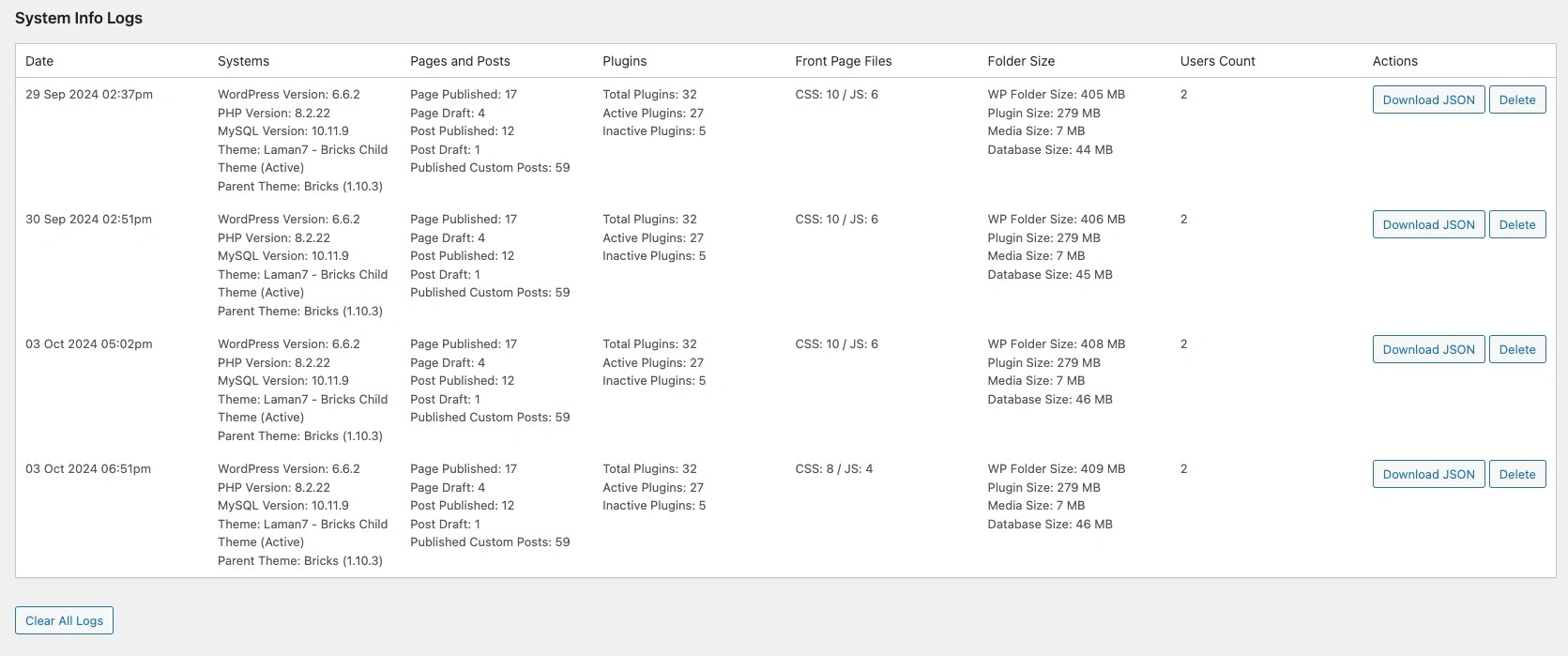
- JSON logs: The plugin stores system information in JSON format for easy access and sharing.
- Downloadable logs: From the dashboard, you can download these JSON logs with one click, making it easy to save them for reference or share with your team.
- Clear old logs: Easily clear old logs when they’re no longer needed, freeing up server space.
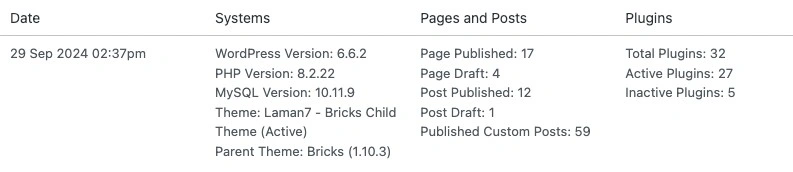
- Logs include:
- WordPress, PHP, and MySQL versions.
- Theme and plugin details (including active/inactive status).
- Page and post counts (including custom post types).
- File sizes for the WordPress folder, plugins, uploads, and the database.
- Number of users on the site.
- CSS and JS file counts loaded on the front page.
- Scheduling options: Easily choose between manual or automated scheduling for log generation, depending on how often you want to check your system.
How to Install the WebCare WP Status Plugin
Getting started with the WebCare WP Status Plugin is super simple:
- Download the Plugin: First, you’ll need to grab the plugin from the download link (see below).
- Upload it to WordPress: In your WordPress dashboard, go to Plugins > Add New > Upload Plugin. Select the ZIP file of the plugin, and click “Install Now.”
- Activate the Plugin: Once installed, click “Activate Plugin,” and you’ll see the WebCare WP Status option appear under the Tools section of your WordPress dashboard.
How to Configure the Plugin
After installation, configuring the plugin is a breeze:
- Go to Tools > WebCare WP Status: This is where you’ll find all your logs and settings.
- Set Up Your Schedule: You can choose from several scheduling options:
- Daily
- Weekly (default)
- Monthly
- Custom interval (select how many days between logs)
- Manual (disabled schedule)
- Check the Logs: Once the plugin generates a log, you can download it directly from this page. There’s also an option to delete old logs, keeping your log folder neat and tidy.
Bonus: The plugin shows a handy countdown on how long it will take until the next log is generated, so you always know when to expect the next update!
Download Location
You can download the WebCare WP Status Plugin directly from our website. Just visit our Github and grab the latest version.
In summary, the WebCare WP Status Plugin is a lifesaver for anyone who wants to automate the tracking of changes in WordPress. By giving you an easy-to-use logging system, it helps you stay organized, avoid unnecessary complications, and manage your website with confidence.
Download it today and take control of your WordPress site like a pro!