Hey guys! Let’s fix the annoying pagination issues once and for all.
For context, I get 404 errors when I turned on the “Enable Ajax”. While ajax make look seamless, it’s terrible for 404 errors, especially if you’re aiming for higher Ahref crawl score.
I went through several Bricks Forum to find the solution.
- https://forum.bricksbuilder.io/t/pagination-404-error-in-posts-category-archive-template/29156
- https://forum.bricksbuilder.io/t/pagination-and-404-error/14225
- https://forum.bricksbuilder.io/t/no-bug-404-error-in-woocommerce-products-archive-pagination/28726
Overview Solution
Here’s a quick understanding to solve it.
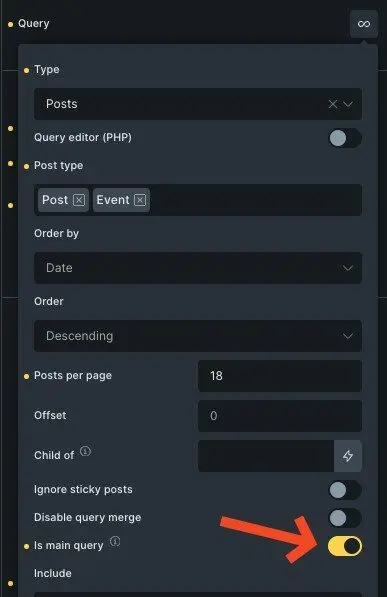
- Change query post to “is main query”
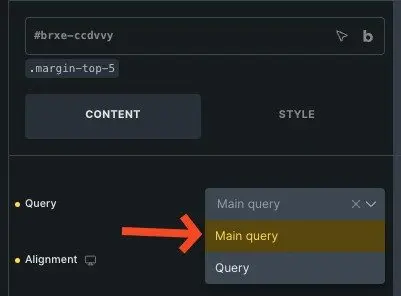
- Change the pagination to “main query”
For more detailed approach follow short tutorial below.
Fix the Query Loop
In your query loop, enable the “is main query”. Declare once if you have multiple query loops.
Change the Pagination Value
Either add the “pagination element” or choose the element. Then choose “main query”
Once you’ve saved the Bricks editor, preview it. It should work correctly.
Testing
Go the the front end. Click on the pagination numbers. It should render correctly.

Another test you can do is going directly to the page and see it if works.
e.g. https://domain-.com/category/{term}/page/3/ and so forth
I hope this solves your problems!