

We’re going to do two experiment for WebP Performance,
- Convert optimised JPEG and PNG to WebP
- Transparent PNG to WebP.
A promising result! The question is “Will WebP be your new choice of your image format?”
Let’s find out.
The major motivation boost for the WebP is because of 96.3% of modern browser in 2023. Only less than 4% does not support it.

However, this does not mean users are using the latest browser in market due hardware constraint, company/ organisation issued computers. Which means, if the users didn’t update the browser, it’s unlikely for them to be able to see WebP.
WebP is also not support before in iOS14 (before 2020) and Android 4.0 (after 2011).
What is WebP?
WebP is a type of image format which is smaller in size, easier to manage and comes with it’s set of drawback. WebP was developed by Google in 2010.
- Smaller in size – Faster to load
- Easier to manage – Not having to weigh between PNG or JPEG
- Drawback – May not look as pretty
For the past few months I’ve been testing on using WebP exclusively for our projects at Laman7 and I’m happy to share the webp performance with you.
WebP Size Compared to Older Formats
In my testing, I found that it can reduce up 90% of the size (depending on the quality of your image).
Apparatus and Software
- Computer: Mac with OS
- Image Compression: Image Optim (Apple Store)
- WebP Processing: WebP Converter (Apple Store)
- Method: Not optimised -> Optimise Image -> Convert to WebP
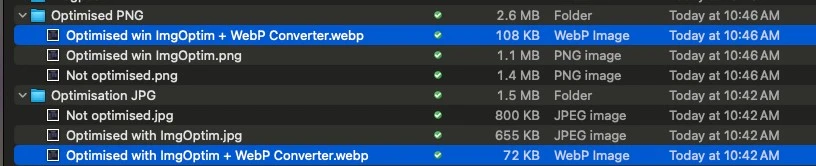
For PNG – Result 108kb
The original image size is 1.4mb.
After optimisation, I reduced it down to 1.1mb (20% reduction)
Then convert to WebP, 108kb (93% reduction)
For JPG – Result 72kb (Winner)
The original image size is 800kb (significantly lower than PNG)
After optimisation, I reduced it down to 655kb (20% reduction)
Then convert to WebP, 72kb (90% reduction)
As you can see, the choice of PNG and JPG after converting to WebP 36kb (33%) difference.
In it’s raw format, its 600kb (42%) difference.
How About Transparent PNG?
I did some testing to figure this out as well.
Here’s what I did
- Download an image from Unsplash
- Remove the background to make it transparent
- Saved as PNG
- Convert PNG to WebP

The result, 90% reduction in size, from 470 KB to 47 KB with images looking identical.
To prove that it’s transparent, here’s the image with yellow background

Conclusion WebP Performance
Should you start adopting WebP? It depends on your target market. If you’re a government agency, you need to appeal to everyone. If you’re a high-tech-based company, you’d probably want like-minded clients and so forth.
While WebP Performance shown here is around 90% improvements, WordPress plugins may be around 40-70% performance in real-world scenarios.


