

When I first got into managing WordPress sites and WordPress security, I thought security meant protecting the WordPress installation itself. It turns out there are WordPress security layers!
I focused on things like strong passwords, two-factor authentication, and keeping plugins up to date.
But over time, I’ve realized that truly securing a WordPress site requires a multi-layered approach—one that goes well beyond just the WordPress dashboard.
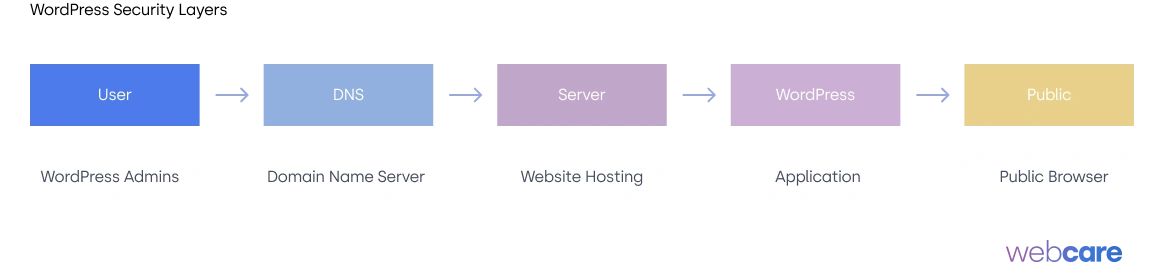
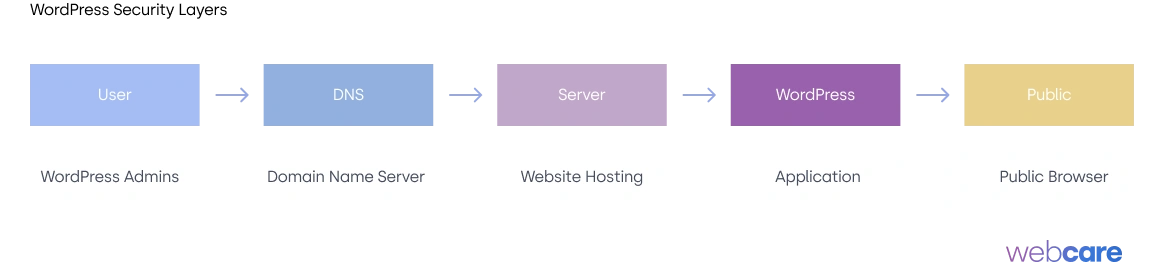
There are three critical layers in a website’s security: The User, the DNS layer, the server layer, and the WordPress layer. Most WordPress owner focuses on WordPress Layer.
Here’s an illustration of these security layers.

In today’s blog post, we’ll talk about most Marketers and Website Owner avoid, security.
Table of Contents – WordPress Security Layers
Zero Layer Security – The WordPress User
What it is the ‘Zero’ Layer?
Often overlooked, the WordPress user is the “zero layer” of security—the first point where vulnerability can enter.
A user’s own device and browsing habits can open the door to malware, phishing, and password theft, all of which compromise even the best-protected site.
Common mistakes to avoid:
- Using a malware-infected device: Logging into your WordPress site from a compromised device can expose passwords and sensitive data. Always ensure your device has reputable antivirus software and regular malware scans.
- Insecure internet connections: Accessing your WordPress admin from an unsecured Wi-Fi connection, such as in a coffee shop, exposes your login credentials to potential eavesdropping. Always use a secure, private connection or a VPN to prevent interception.
- Weak passwords and password reuse: Reusing passwords or relying on weak ones (like “password123”) can allow attackers to easily breach your site. It’s essential to use unique, strong passwords for WordPress and all accounts tied to your site’s management.
The takeaway:
Educating users on safe browsing habits, secure passwords, and protective software is key.
By minimizing these “zero layer” vulnerabilities, you add another essential layer of security to protect your site from human error.
My Trick for User Security
Limit the users ability to login to the backend based on Location. If your office is in Australia, then allow only traffic from Australia, likewise with other countries.
You can do this easily with CloudFlare.
The second method is WFA, where users need to authenticate their access. I’m pro on this initiative because it can be overkill.
1st Layer – DNS Layer Security
What it DNS Layer
The DNS (Domain Name System) layer is like the digital address book for the internet. It tells browsers where to find your site. DNS is the very first entry point to your website, and if it’s compromised, hackers can redirect your visitors to malicious sites without your knowledge.

How to secure it:
- DNSSEC: Implement DNS Security Extensions (DNSSEC), which add a layer of authentication to DNS records and help prevent “man-in-the-middle” attacks.
- Reputable DNS providers: Use a secure DNS provider like Cloudflare or Google DNS, which come with added protection against DDoS (Distributed Denial of Service) attacks and have built-in threat detection.
- Regular monitoring: Keep an eye on your DNS records, and set up alerts to notify you if there are any changes. DNS hijacking can happen silently, and the sooner you catch it, the better.
Securing the DNS layer is your first line of defense. Without it, even the best server and WordPress security measures might be rendered useless if your traffic is intercepted and redirected.
My Trick for DNS Layer
Use CloudFlare to configure the DNS and where you bought your domain from. Migrating DNS is easy, it may appear scary, and bottom line, if you screw up, you can always reverse it.
2nd Layer – Server Layer Security
What it is the Server Layer?
The server layer is where your website’s files are stored.
It’s the foundation of your site and is managed by your hosting provider (or yourself if you’re running a dedicated server).
Without proper server security, hackers can gain access to all your files, data, and even the personal information of your users.
How to secure it:
- Firewalls and DDoS Protection: Ensure your server has a firewall and DDoS protection. A web application firewall (WAF) adds a barrier that filters incoming requests, blocking those that seem suspicious.
- Regular updates and patches: Make sure your server software is always up to date, and apply patches as soon as they’re available. Many attacks exploit outdated server software.
- Secure server access: Use SSH instead of FTP for accessing the server. Set up public/private key authentication and disable password-based logins to prevent brute-force attacks.
Investing in a secure hosting provider with these security features can make all the difference.
At the end of the day, your site’s performance, availability, and integrity depend heavily on how well your server is secured.
My Trick for Server Security
Don’t settle for the cheapest hosting.
Don’t do shared-hosting. You don’t know what your neighbour is cooking
3rd Layer – WordPress Layer Security
What it is the WordPress Layer?
This is where most people start when they think about WordPress security. And while it’s important, it’s just one part of the puzzle. The WordPress layer includes everything within the WordPress installation itself, from plugins and themes to settings and user roles.
How to secure it:
- Updates, updates, updates: Keep WordPress core, themes, and plugins updated to the latest versions. Many vulnerabilities are patched through updates, so ignoring them creates risk.
- Limit plugins and themes: Only use well-reviewed plugins and themes from trusted sources. Each plugin or theme adds potential vulnerabilities.
- Strong user management: Enforce strong passwords, limit admin users, and use two-factor authentication. Many attacks start by exploiting weak passwords.
Don’t get me wrong—securing the WordPress layer is essential. But it won’t be enough if other layers are compromised.
My Tricks for WordPress Security
- Use licensed plugins – you can get support quickly
- Always Create Backup – with backup, you can move your WordPress anywhere else.
- Have a fallback plan – Who do you call for anything WordPress?
- Change your /wp-admin location – This will reduce potential threat by half
Taking a Holistic Approach to WordPress Security
The best security strategy for your WordPress site is one that addresses all three layers: DNS, server, and WordPress. Here’s what a holistic approach looks like in action:
- Start from the outside in: Begin by securing your DNS, then move to the server, and finally the WordPress installation.
- Monitor activity: Use tools to monitor DNS changes, server access logs, and WordPress login attempts. Many attacks have signs that you can catch early if you’re monitoring properly.
- Backup often and across layers: Have a backup plan in place at both the server level and within WordPress. This way, if anything goes wrong, you can restore your site from a secure backup.
- Your Users: Limit the number of users who can have access to your website, how they used their account and their location.
Security isn’t about setting things up once and forgetting it. It’s about a continuous process of protecting, monitoring, and adapting to the latest threats.
When you take the time to secure each layer—DNS, server, and WordPress—you’re not only reducing the risk of an attack but also strengthening the trust and reliability of your website for every visitor who clicks on it.
Ready to take your WordPress security to the next level? With WebCare, you get expert-level security and ongoing maintenance tailored to keep your site safe, fast, and running smoothly.
From proactive protection to regular updates and hands-on support, we handle it all so you can focus on what you do best. Don’t leave your site vulnerable—let’s secure it together!
Get started with WebCare today and protect your WordPress site with confidence!

