
Here’s the situation: You log into your WordPress then realised that Schedule Action logs are bloated.
What can you do about bloated WP Schedule Action?
You can delete it in bulk in Tool > Schedule Action.
However, that would mean that it you have to
- Manually bulk select for every 100s
- Revisit every day to delete Schedule Action
We don’t have that luxury of time.
Table of Contents
What is WP Scheduled Action
In WordPress, there’s a function that’s independent of Cron Jobs called WP-Cron. This function acts like a cron and is trigger everything the website loaded using wp_load function.
Many plugins rely on wp_cron function to fetch content from external or perform actions (like send email, synchronization, back up, update database, update plugin etc.)
Who Uses Scheduled Action?
There are many plugins that leverages on wp_cron for example
- Fluent Form – Performs every 5 minutes
- Fluent Booking – Performs every minute
- RankMath – fetch data every 3 days
- All in One SEO
- Woocommerce – to sync orders
- WP Forms
- WP Activity logs
Anything that requires action. You can view it under Tools (on left) -> Scheduled Actions.
You can see the entire list of plugins that uses wp_cron function.
What Happens if You Let it Be?
Your database will be bloated. Here’s an example from the website we maintained.
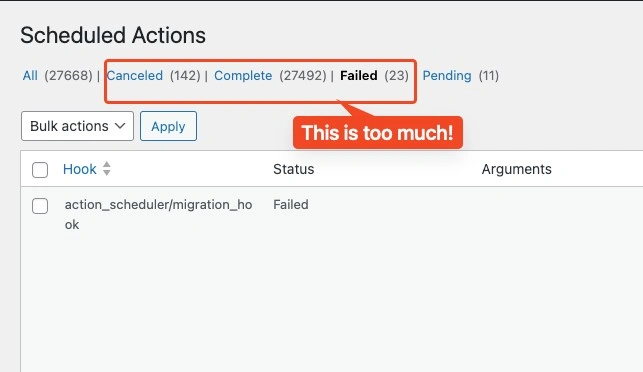
Without going deep into technical, bloated database means it’s slower to fetch data.
Here’s a physical world example (which made more sense)

Auto Delete Bloated WP Schedule Action
I found this neat trick by BlackHills that uses WP Snippets to automatically delete WP Schedule Action on load.
Add the following code in functions.php or Snippet
<?php
/** @see https://wpcodebook.com/woocommerce-action-scheduler-cleanup-php/ */
add_filter( 'action_scheduler_default_cleaner_statuses', function ( $statuses ) {
	$statuses[] = 'failed';
	return $statuses;
} );

// Default is 20
add_filter( 'action_scheduler_cleanup_batch_size', function ( $batch_size ) {
	return 100;
} );

// Default is 31 days
add_filter( 'action_scheduler_retention_period', function ( $period ) {
	return 3 * DAY_IN_SECONDS;
} );

// Calls the function that purges Action Scheduler database tables.
add_action( 'wp_loaded', function () {

	// Timestamp examples, in seconds
	// 1 day = 86400
	// 3 days = 259200
	// 1 week = 604800

	// MailPoet
	webcare_core_purge_action_scheduler_group_actions( 'mailpoet-cron', 259200 );

	// Rank Math SEO
	webcare_core_purge_action_scheduler_group_actions( 'rank-math' );

} );

/**
 * Purges Action Scheduler tables of complete, failed, or cancelled actions
 * Starts with oldest actions first.
 *
 * @link https://blackhillswebworks.com/2024/08/29/automatically-clean-action-scheduler-database-tables/
 *
 * @param string   $group   The group associated with a specific plugin.
 * @param int|null $seconds Number of seconds. Defaults to 86400 (1 day).
 */
function webcare_core_purge_action_scheduler_group_actions( string $group, int $seconds = 86400 ) {

	// If there's no group specified, we're done.
	if ( empty( $group ) )
		return;

	// If for some reason Action Scheduler is not in use, do not proceed.
	if ( ! function_exists( 'as_get_scheduled_actions' ) )
		return;

	// time() returns the current Unix timestamp (GMT)
	$time_to_check = time() - $seconds; // Current time minus number of seconds

	// @link https://actionscheduler.org/api/
	$args = array(
		'date'         => $time_to_check,
		'date_compare' => '<', // older than $time_to_check
		'group'        => $group,
		'per_page'     => 200,  // default is 5; -1 for all results
	);

	// Action Scheduler function that returns an array of ids
	$actions_to_delete = as_get_scheduled_actions( $args, 'ids' );

	// Need to implode the array to use with SQL
	$actions_to_delete = implode( ', ', $actions_to_delete );

	if ( empty( $actions_to_delete ) )
		return;

	global $wpdb;

	$sql_actions = "DELETE FROM $wpdb->actionscheduler_actions
					WHERE status
					IN ( 'complete','failed','canceled' )
					AND action_id
					IN ( $actions_to_delete )";

	$wpdb->query( $sql_actions );

	$sql_logs = "DELETE FROM $wpdb->actionscheduler_logs
				 WHERE action_id
				 IN ( $actions_to_delete )";

	$wpdb->query( $sql_logs );

}
Explanation about the Snippet
Line 10: Default is 20, but I change it to 100. If your hosting server occasionally hangs, use 20.
Line 15: Change how long do you want to keep. Default is 31 days.
Line 19: Triggers every time a WordPress Page is visited.
Warning: Using the Snippet
While this works on our website that we maintained, it may not work for you depending on your WordPress configration.
Before you activate the Snippet, please make sure you have a back of your database.
Follow the progress on Github WebCare
Result Bloated WP Schedule Action
From 27,000 log entry, down to 1600-ish. Does a pretty good job.
The result is not immediate. It will take 1-2 days to clear out the bloated logs. Ours took 24 hours.
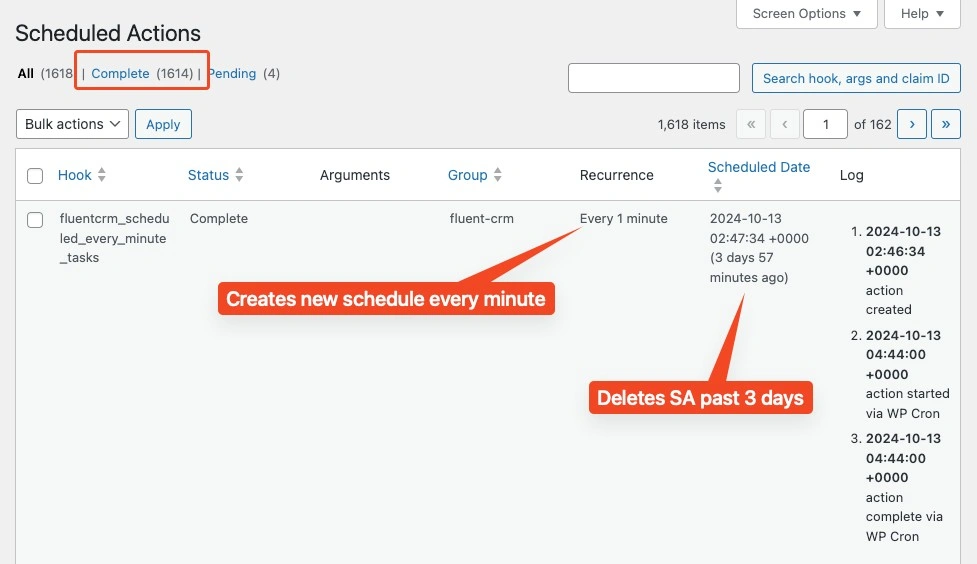
If you’re experiencing issues with Schedule Action, try out the snippet.
Alternatively, if you do not want to deal with WordPress at all and focus only on your business operations, finance, marketing you can always hire WebCare.