
WordPress is a dynamic platform that runs scheduled tasks, also known as “scheduled actions” or “cron jobs,” behind the scenes.
These actions help automate various tasks, from publishing scheduled posts to clearing out expired transients.
But what happens when you notice a buildup of these scheduled actions in your WordPress database? Should you delete them? What if you delete the wrong ones?
Can you delete Scheduled Action in WordPress? Yes, you can. Delete only “Completed” and “Failed” scheduled actions. Don’t delete any in “Pending”.
Check out the snippets that Automatically deletes Schedule Actions
Let’s dive into the details.
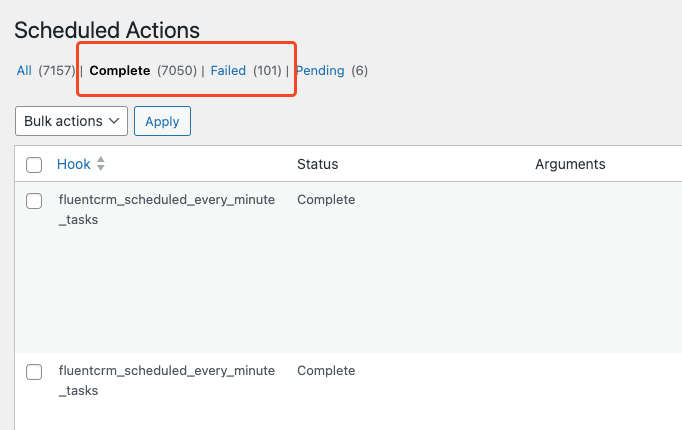
Table of Contents
Why Scheduled Actions Matter
Scheduled actions in WordPress play a crucial role in keeping your website running smoothly. They are responsible for tasks such as:
- Publishing scheduled posts: Ensuring that your content goes live at the specified time.
- Clearing expired transients: Removing temporary data stored in the database to improve performance.
- Sending automated emails: Dispatching notifications, password resets, or other emails.
- Plugin and theme updates: Some plugins and themes use scheduled actions to perform updates or other maintenance tasks.
These actions are managed by WP-Cron, WordPress’s built-in scheduling system. However, WP-Cron is not without its flaws, and over time, you might find yourself with a backlog of scheduled actions that never seem to execute.
The Problem with Excessive Scheduled Actions
When scheduled actions pile up, they can slow down your site’s performance, cause database bloat, and even prevent critical tasks from executing. This can lead to missed post publication times, outdated data, or unexecuted tasks that are important for your site’s functionality.
Why this happens:
- Missed Cron Jobs: If your site doesn’t get enough traffic, WP-Cron might not trigger as expected, leading to a backlog of tasks.
- Faulty Plugins or Themes: Some plugins or themes might improperly schedule actions that never execute, causing a buildup.
- Server Issues: Server-related problems can also cause scheduled actions to fail, leading to an accumulation of pending tasks.
Is It Harmless Not to Delete Scheduled Actions?
While having a few unexecuted scheduled actions isn’t immediately harmful, letting them accumulate can eventually lead to issues. However, if the number of pending actions is small, they typically won’t cause significant harm.
Potential issues include:
- Performance Degradation: Excessive scheduled actions can lead to longer page load times, as WP-Cron tries to process these actions on each page load.
- Missed Tasks: Important scheduled tasks may fail to execute, potentially impacting your site’s functionality.
- Database Bloat: Unused or outdated scheduled actions can increase the size of your database, making backups and restores more cumbersome.
The Risks of Deleting the Wrong Scheduled Actions
While deleting unnecessary scheduled actions can help optimize your site, doing so carelessly can have unintended consequences. Deleting the wrong actions might cause:
- Broken Plugins: Some plugins rely on scheduled actions for their core functionality. Deleting these actions could break the plugin and its associated features.
- Missed Notifications: Automated emails or alerts may fail to send if the corresponding scheduled action is deleted.
- Unpublished Content: If you delete a scheduled action responsible for publishing a post, that post may never go live.
Therefore, it’s crucial to be cautious when managing scheduled actions. Deleting the wrong ones could result in lost functionality or incomplete tasks, leading to a poor user experience.
Best Practices for Managing Scheduled Actions
To safely manage your scheduled actions, consider the following tips:
- Backup Your Site: Before making any changes, ensure you have a recent backup of your site. This way, you can restore it if something goes wrong.
- Identify Redundant Actions: Use a plugin to identify scheduled actions that are outdated, redundant, or related to deactivated plugins or themes.
- Use Plugins for Safe Management:
- WP Crontrol: This plugin allows you to view, edit, and delete scheduled actions with ease. It provides detailed information about each action, helping you make informed decisions.
- Advanced Cron Manager: This plugin offers advanced control over your scheduled actions, including the ability to pause, resume, or delete specific tasks.
- Scheduled Action Monitor: This tool helps monitor and manage scheduled actions, alerting you to any issues that need your attention.
- Be Selective: Only delete scheduled actions that you are certain are unnecessary or problematic. If in doubt, it’s safer to leave them alone or consult a developer.
- Automate Cleanup: Consider using a plugin like WP-Optimize to regularly clean up your database, including old scheduled actions, without risking the deletion of critical tasks.
Conclusion
Deleting scheduled actions in WordPress can be a double-edged sword. While it’s essential to manage these actions to prevent performance issues, database bloat, and missed tasks, doing so carelessly can lead to broken functionality and other problems.
By following best practices and using reliable plugins like WP Crontrol or Advanced Cron Manager, you can safely manage your scheduled actions and keep your site running smoothly.
Always remember to back up your site before making any changes, and when in doubt, seek advice from a WordPress professional.
