“Phew, the website is up and running. Let’s cross that off the checklist.” – Website Owner
If this sounds familiar, take a deep breath. The truth is, your website journey has just started. Much like buying a car, a website needs ongoing website maintenance to keep it running smoothly and efficiently.
Table of Contents – Why Do Website Maintenance
Your Website: The Digital Face of Your Business
In today’s digital age, your website is often the first point of contact between your business and potential customers. People no longer drive to a physical location to learn about a company; they search online before making a purchase.
According to a Google/Ipsos study, 63% of shopping occasions begin online. This means that for many businesses, their website is their most important storefront. It needs to be not just functional, but impressive, informative, and up-to-date.
Website Maintenance is not an insurance scheme; it’s a full service. You hire someone to do it for you or you do it yourself. I’ll give you some basics later on.
Why Does Your Website Need Maintenance?
There are three simple reasons to maintain your website: AI, Relevancy, and Outdated.
1. The Rising Tide of AI and Bots
As artificial intelligence advances, so do the tools used by hackers and malicious actors. Bots are creating other bots to find and exploit loopholes in website security.
Regular maintenance ensures your site’s defenses are up-to-date against these evolving threats.
2. Staying Visible to Prospects and Google
Search engines like Google regularly update their algorithms. Without maintenance, your once-optimized site might fall in rankings, becoming invisible to potential customers.
Regular updates to your content and technical SEO elements keep you in the game.
3. Code Expiration and Technological Advancement
Web technologies evolve rapidly. What was cutting-edge a year ago might be obsolete today. Regular maintenance ensures your site keeps pace with these changes, maintaining compatibility with new browsers and devices.

Can I Do Without Website Maintenance?
Sure. Only if the following applies
- Your website is based on HTML only (rarely the case)
- You don’t sweep your office lobby
- You don’t mind driving a beat-up vehicle that can break at any time
- You like to gamble the odds
- You don’t want new leads from website
- You love to reply to hundreds of WhatsApp messages
- You can maintain/code it yourself
The truth is that basic website maintenance is straightforward, it only takes 30 mins per month (or less).
Follow my guide below.
Basic Website Maintenance for WordPress
1. Backup, Backup, Backup
Regular backups are your safety net. They ensure that if something goes wrong, you can quickly restore your site to a working state. Implement automated daily backups of both your files and database.
2. Scan for Issues
Regular scans for malware and monitoring for suspicious traffic patterns can catch potential security breaches early. Use reputable security plugins and keep them updated.
Have extra time? Dive into the access and error log. Please keep them in check.
3. Improve Content
Fresh, relevant content is crucial for SEO and user engagement. Update your content regularly, add new blog posts, and ensure all information is current.
You can get more ideas by
- Asking your customers
- Think from your customer’s shoes
- Peeking at competitor website
- Getting feedbacks from product managers
- Looking at Google Search Console data
- Checking the website heatmap
- or Looking at Google Analytics
- Get inspiration from Top Linkedin creators
4. Clear Cache
Clearing your website’s cache periodically can resolve many common issues and ensure that users see the most up-to-date version of your site.
5. Update Your WordPress, Plugins and Themes
It takes 5 minutes to update the plugins. Click on ‘update’ and wait for it to be done.
6. Check Your Website Speed
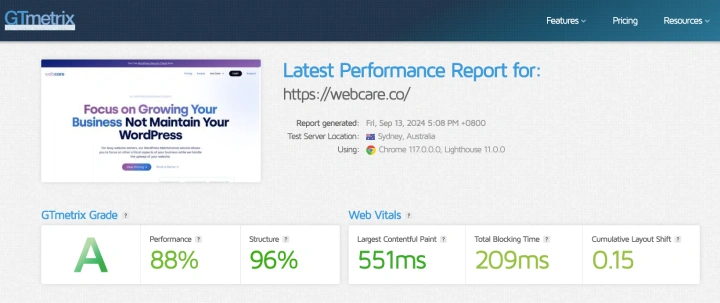
Your website will become slower over time due to higher traffic, newer complex plugins, and outdated hardware. Check your website speed with GTMetrix.
How Often Should You Maintain Your Website?
The frequency of maintenance depends on the complexity of your website. A simple five-page website doesn’t need as extensive maintenance as a 100-page e-commerce site.
Rule of Thumb: More moving parts mean more potential points of failure.
For most small to medium-sized business websites, a monthly maintenance routine is a good starting point. Larger, more complex sites might require weekly or even daily attention.
Take Control of Your Website’s Health
Ready to dive into website maintenance? Download our guide to maintaining your own website and start protecting your digital investment today.
[Download Our DIY Website Maintenance Guide]
Need Expert Help?
Feeling overwhelmed? Website maintenance requires time, expertise, and constant vigilance. If it’s too much to handle alongside running your business, I ask that you please consider professional help.
WebCare – Website Maintenance Service
Remember, your website is an investment. Like any valuable asset, it needs care and attention to continue performing at its best.
Don’t wait for problems to arise – start your maintenance routine today!